Create
Design Your Spaceship
An interactive rocket design exhibit that turns choices into a visible flight.
Discover
A scale of the universe exhibit that connects the very small with the very large.
Discuss this exhibit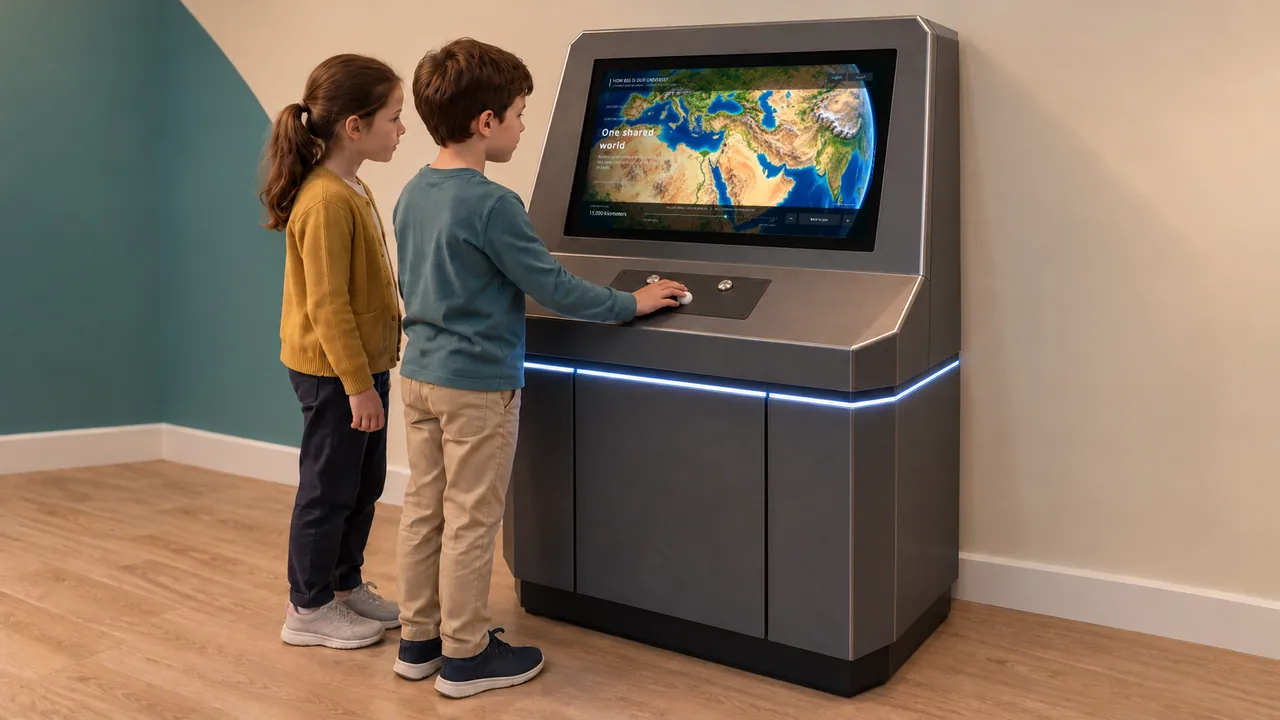
Overview
How Big Is Universe starts with a familiar reference point: a person. Visitors use a physical control to move toward smaller or larger scales, revealing illustrated scenes and explanations along the way.
The journey reaches in both directions. Cells and atomic structures sit on the same scale-based pathway as Earth and astronomical environments. Instead of presenting size as a list of large numbers, the exhibit gives visitors a sequence of comparisons they can navigate themselves.
How Big Is Universe · YouTube
Watch the exhibit in action.
YouTube loads only when you press play.YouTube ↗
Gallery
Visitors compare orders of size and explore the difference between what can be seen directly and what needs a model or scientific image. The atomic nucleus, cells, Earth and cosmic structures provide contrasting examples. Approximate scale labels help connect each scene to its neighbors.
| Dimensions | 1080 × 900 × 1165 mm |
|---|---|
| Power requirement | 900 W |
| Display | 32-inch signage display; customizable |
| Simultaneous users | 1 |
| Recommended ages | 6 years and above |
| Supply scope | Exhibit PC, cabinet, lighting, signage display, trackball and language-selection switches |
| Standard software languages | English / Spanish / Arabic |
| Additional languages | Available on request |
| Customization | Dimensions, materials and appearance can be customized |
| Standard warranty | 1 year |
Specifications describe the configuration listed here. Contact us for the complete equipment schedule and installation drawing for your project.
The exhibit fits science museums, astronomy galleries and family discovery centers. It can connect several subjects within one gallery, giving visitors a common way to compare biology, everyday objects and space. A companion can read or discuss each scene while another visitor operates the control.
We supply How Big Is Universe as a freestanding kiosk with a 32-inch signage display, a trackball and language-selection switches. The standard exhibit measures 1080 × 900 × 1165 mm, requires 900 W and supports one user at a time, aged 6 and above. The display, dimensions, materials and appearance can be customized. English, Spanish and Arabic are standard, with additional languages available on request.
Our How Big Is Universe experience brings together scale-exploration software, physical controls and a landscape display. We supply the exhibit PC, cabinet, lighting, signage display, trackball and language-selection switches. Your project proposal sets out the final configuration, installation and training scope, and any ongoing services. Every exhibit includes a one-year standard warranty.
No. The demonstrated content includes cells and atomic structures as well as Earth and larger astronomical environments.
The preview instructs visitors to roll backward for smaller scales and forward for larger ones, with a control for returning to the human reference.
The interface presents approximate scale labels and illustrative explanations. Details of some models are simplified to make the subject visible.
English, Spanish and Arabic are included as standard. Additional languages are available on request, and visitors choose their language using the selection switches.
Tell us about your science or space gallery to discuss a scale-exploration kiosk.
Discuss this exhibit
Create
An interactive rocket design exhibit that turns choices into a visible flight.