Create
AI Painter: Interactive AI Drawing Kiosk
An interactive AI drawing kiosk that turns a simple sketch into a larger picture.
Discuss this exhibit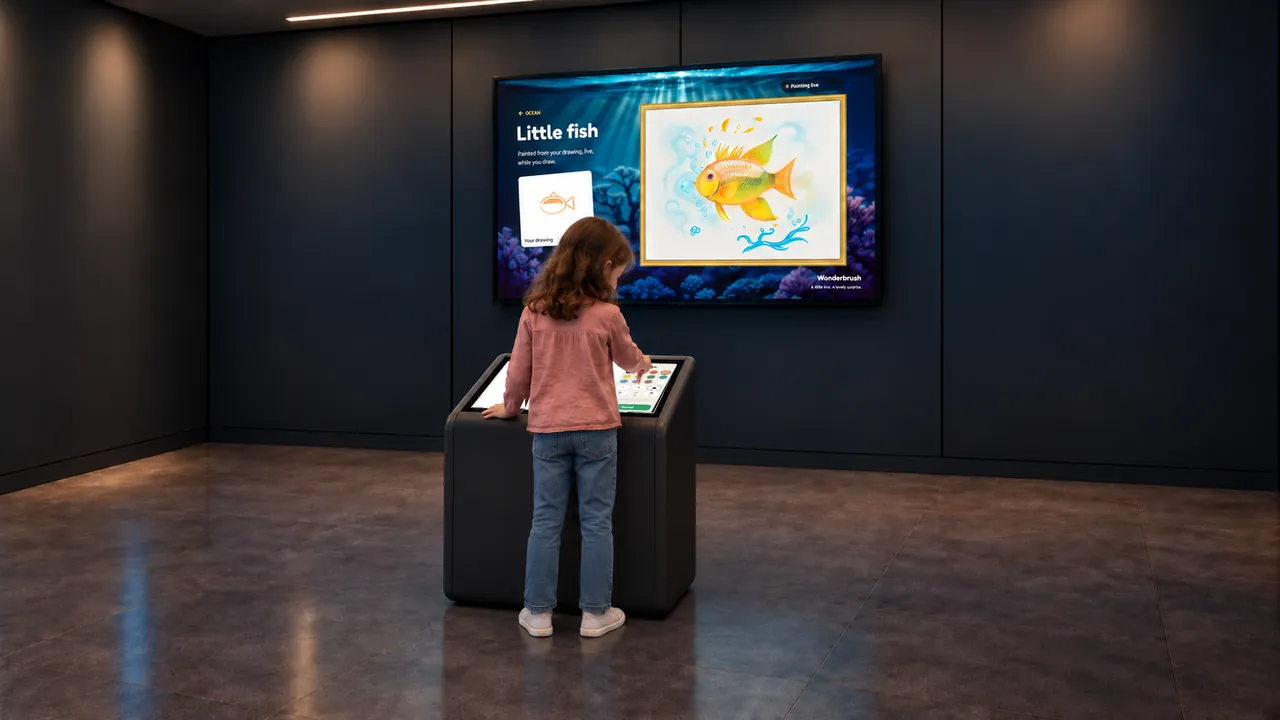
Overview
AI Painter starts with the visitor’s drawing. A touchscreen kiosk provides the canvas and drawing tools, while a separate large display presents artwork generated from the evolving sketch.
The visible connection between the small drawing and the larger result makes the process part of the attraction. Visitors can add a line, change a color and compare what appears, while companions follow the transformation on the main screen.
AI Painter · YouTube
See the interaction.
Watch the exhibit in action.
YouTube loads only when you press play.YouTube ↗
Gallery
A closer look.
The Visitor Experience
- Choose a drawing subject in the kiosk interface.
- Sketch with the available colors and drawing tools.
- Watch the generated artwork develop on the large display.
- Add or change marks and compare the new result.
What Visitors Discover
Visitors explore how a rough shape can suggest a recognizable subject and how an AI system interprets visual input. Comparing the original sketch with the generated picture creates a practical starting point for talking about authorship, interpretation and creative choices.
Explore the Content
- Ocean: the preview shows a simple fish drawing becoming a detailed underwater picture.
- Animals: a kitten example connects a few drawn shapes with an animal illustration.
- Garden: a flower sketch develops into a colorful garden image.
- Space: a rocket example introduces a different subject and setting.
Key Features
- A touchscreen drawing canvas with selectable tools and colors.
- AI-generated visual responses to visitor sketches.
- A separate large display for shared viewing.
- Several subject worlds demonstrated in the supplied preview.
Specifications
| Dimensions | Customizable |
|---|---|
| Display | 21-inch touchscreen and 65-inch digital signage display as standard; display sizes customizable |
| Recommended ages | 5 years and above |
| Supply scope | Exhibit PC, cabinet, touchscreen and digital signage display |
| Standard software languages | English / Spanish / Arabic |
| Additional languages | Available on request |
| Customization | Dimensions, materials and appearance can be customized |
| Standard warranty | 1 year |
Specifications describe the configuration listed here. Contact us for the complete equipment schedule and installation drawing for your project.
Who It’s For and Where It Fits
AI Painter is designed for visitors aged 5 and above in children’s museums, creative discovery centers and galleries introducing digital art or artificial intelligence. Visitors draw at the kiosk while companions can watch the main display, making the transformation visible beyond the person using the controls.
Exhibit Configurations and Customization
Our standard configuration pairs a 21-inch touchscreen with a 65-inch digital signage display. Screen sizes, cabinet dimensions, materials and appearance can be customized. We plan kiosk position and display sightlines together for your venue. English, Spanish and Arabic are standard software languages, with additional languages available on request. We agree the subject selection and any additional drawing themes in your project scope.
Space and Installation Requirements
- Provide an operating position in front of the kiosk with a clear view of the large display and circulation for spectators.
- Control reflections on the drawing surface and coordinate the wall display’s brightness with the room.
- Specify computer performance, cooling, power and data connections for the AI software. Confirm internet dependency and any external processing before installation.
What’s Included
Our AI Painter experience brings together sketch-to-art software, a touchscreen kiosk and a separate viewing display. We supply the exhibit PC, cabinet, touchscreen and digital signage display. The standard screen sizes are 21 inches for drawing and 65 inches for viewing. Your project proposal sets out the final configuration, installation and training scope, and any ongoing services. Every exhibit includes a one-year standard warranty.
Application Examples
- Children’s museums: connect simple mark-making with a visible generated result.
- Art and technology galleries: give visitors a direct example of image interpretation by AI.
- Family discovery centers: create a drawing station whose results are shared on a larger screen.
Frequently Asked Questions
Does the visitor start with a written prompt?
The demonstrated experience starts with a subject choice and a touchscreen sketch.
Why are there two screens?
The kiosk is the drawing surface; the large display lets the artist and nearby visitors follow the generated artwork.
Which subjects are demonstrated?
The preview includes fish, kitten, flower and rocket examples. The delivered subject library should be specified in the quotation.
Does it require an internet connection?
The processing and licensing arrangement must be confirmed for the supplied system. The page should not assume cloud processing or fully offline operation.
How quickly does the picture change?
The preview shows the image developing during drawing. Actual response time depends on the supplied software and computer, so a performance claim should be based on that configuration.
Related Interactive Exhibits
- Sketch Bloom: Compare AI sketch interpretation with paper drawings entering an animated scene.
- Digital Graffiti: Offer direct spray painting on digital walls and vehicles.
- Sketch Music: Connect mark-making with sound in another creative exhibit.
Plan Your Exhibit
Share your venue, drawing audience and preferred display arrangement to discuss AI Painter.
Discuss this exhibitKeep exploring.
All interactives
Create
Sketch Music
An interactive musical drawing exhibit where marks become part of a sounding world.