Create
Digital Graffiti: Interactive Spray Painting Wall
A digital graffiti wall for large-scale creative play.
Discuss this exhibit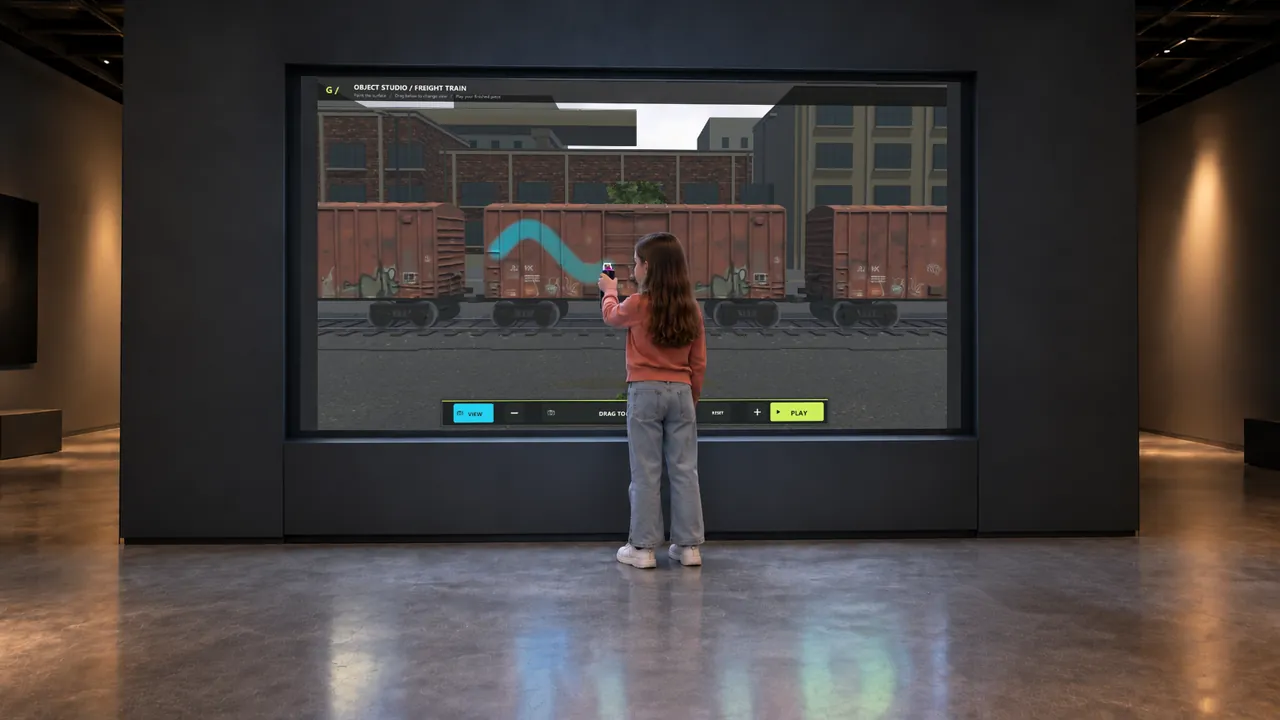
Overview
Digital Graffiti puts the gesture of spray painting into a screen-based experience. Visitors point a digital spray controller at a large display and build an artwork with color, marks and layered effects.
The software extends beyond a flat wall: the supplied preview also shows painting on a street car and a freight train, then viewing the artwork on the moving vehicle. It gives creative galleries a visible making activity that people can follow as the picture develops.
Digital Graffiti · YouTube
See the interaction.
Watch the exhibit in action.
YouTube loads only when you press play.YouTube ↗
The Visitor Experience
- Choose a surface or object to paint.
- Select colors and painting tools, then point the digital spray controller toward the display.
- Build the picture with broad marks, details, stickers or stencils.
- Review the finished work; the demonstrated vehicle scenes can present the artwork in motion.
What Visitors Discover
Visitors experiment with color combinations, composition and the relationship between a mark and the surface underneath it. Changing spray size and flow offers a way to compare broad coverage with fine detail. Painting a three-dimensional vehicle introduces a different visual problem from drawing on a flat wall.
Explore the Content
- Wall Studio: paint against a brick-wall setting using the on-screen tool palette.
- Street car: apply artwork to a vehicle and inspect it from different views.
- Train: decorate a freight wagon and see the painted train move through its scene.
Key Features
- Handheld digital spray interaction.
- Color selection, spray-cap choices, size and flow controls shown in the interface.
- Stickers and stencils alongside free painting.
- Wall and vehicle surfaces, including an animated vehicle presentation.
Specifications
| Display | Projection, signage display or LED wall; customizable screen size |
|---|---|
| Simultaneous users | Up to 20, depending on screen size |
| Supply scope | Detection system, display, exhibit PC and cabinet |
| Standard software languages | English / Spanish / Arabic |
| Additional languages | Available on request |
| Customization | Dimensions, materials and appearance can be customized |
| Standard warranty | 1 year |
Specifications describe the configuration listed here. Contact us for the complete equipment schedule and installation drawing for your project.
Who It’s For and Where It Fits
Digital Graffiti suits creative galleries in children’s museums, discovery centers and family entertainment venues. The large display makes the making process visible to companions, while the painting controls offer room for both quick experiments and more detailed work.
Exhibit Configurations and Customization
We configure Digital Graffiti with projection, a signage display or an LED wall, with a screen size tailored to your venue. The experience supports up to 20 simultaneous users, depending on screen size. We plan the display, detection coverage and painting area together, and customize the dimensions, materials and appearance for the project.
Space and Installation Requirements
- Leave a clear painting zone in front of the display, with room to move the controller and a separate route for spectators.
- Coordinate display brightness and reflections with the chosen screen or projection arrangement.
- Plan tracking coverage, equipment mounting, power, cable protection and service access. Confirm networking and ventilation requirements for the computer and enclosure.
What’s Included
Our Digital Graffiti experience brings together painting software, digital spray controllers and a large display. We supply the detection system, display, exhibit PC and cabinet. Your project proposal sets out the final configuration, controller quantities, installation and training scope, and any ongoing services. Every exhibit includes a one-year standard warranty.
Application Examples
- Museum art areas: give visitors a large canvas for experimenting with color and composition.
- Family entertainment centers: create an activity that is visible to both participants and spectators.
- Discovery centers: compare the creative process on flat walls and vehicle surfaces.
Frequently Asked Questions
Does it use real spray paint?
The painting appears digitally on the display; visitors use a controller rather than applying paint to the room.
Can visitors paint more than a wall?
Yes. The supplied preview demonstrates a street car and a train alongside Wall Studio.
Are there tools for detailed work?
The shown interface includes color selection, spray caps, size and flow controls, stickers and stencils.
Can visitors take the artwork away?
The interface shows a save control, but printing, downloads, sharing and data retention need to be confirmed for the supplied version.
Related Interactive Exhibits
- Sketch Bloom: Move from digital spray painting to colored paper characters.
- AI Painter: Explore a different creative process using AI and a touchscreen sketch.
- Sketch Music: Link visual mark-making with musical interaction.
Plan Your Exhibit
Share your available wall area and preferred painting scenes to discuss Digital Graffiti.
Discuss this exhibitKeep exploring.
All interactives
Create
Sketch Music
An interactive musical drawing exhibit where marks become part of a sounding world.