Build
Build Bloom: Interactive Building Block Table
An interactive building block table that connects physical shapes with digital worlds.
Discuss this exhibit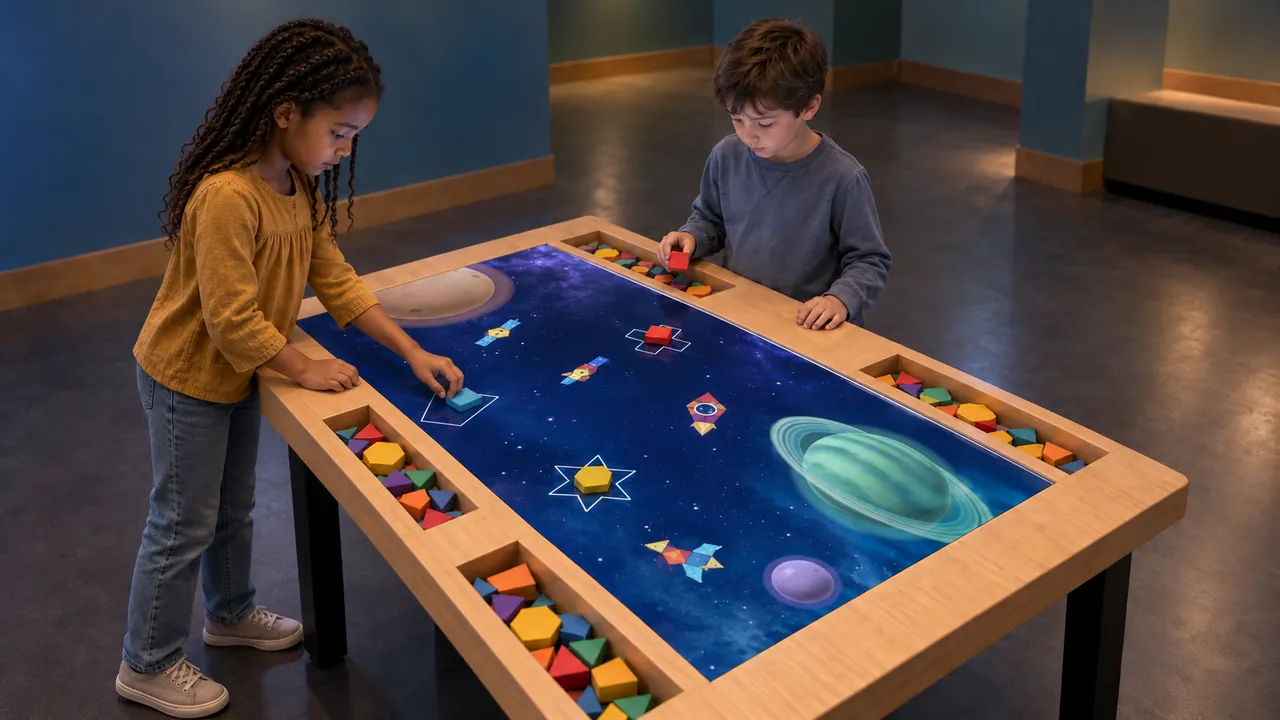
Overview
Build Bloom begins with something visitors can hold. Children arrange colored geometric pieces on a table, matching shapes and assembling simple forms within a digital scene. Their creations become part of the activity unfolding on the surface.
The table brings tactile building and animated content into the same place. Visitors can look at a shape, try a piece, change its position and see what happens, making it a natural addition to creative play areas and children’s museums.
Build Bloom · YouTube
See the interaction.
Watch the exhibit in action.
YouTube loads only when you press play.YouTube ↗
Gallery
A closer look.
The Visitor Experience
- Choose an outline or building area on the table.
- Select geometric pieces from the surrounding storage trays.
- Arrange the pieces to form the shape.
- Watch the digital response and start another creation.
What Visitors Discover
Visitors explore how smaller shapes combine into larger forms. Turning and repositioning a piece offers a practical way to compare edges, angles and patterns. The themed animation gives the activity a visible response without replacing the physical process of building.
Explore the Content
- Space: build among planets, rockets, satellites and other space-themed imagery.
- Koi: explore shape building within a pond-themed setting.
- Arctic: bring the same physical-and-digital play approach into a cold-climate scene.
Key Features
- Physical colored geometric pieces.
- Digital outlines and animated scene content.
- A shared table with storage trays for the building pieces.
- Three demonstrated themes: Space, Koi and Arctic.
Specifications
| Dimensions | 2100 × 1200 × 2350 mm |
|---|---|
| Power requirement | 1 kW |
| Display | Projection |
| Simultaneous users | 6 |
| Standard software languages | English / Spanish / Arabic |
| Additional languages | Available on request |
| Customization | Dimensions, materials and appearance can be customized |
| Standard warranty | 1 year |
Specifications describe the configuration listed here. Contact us for the complete equipment schedule and installation drawing for your project.
Who It’s For and Where It Fits
Build Bloom fits children’s museums, family discovery centers and creative zones within science museums. Families can compare shapes and work beside one another around the table. Its combination of objects and animation also suits venues seeking an activity that extends beyond tapping a screen.
Exhibit Configurations and Customization
The illustrated table uses a wooden surround, integrated piece storage and a central digital activity surface. Specify the table dimensions, theme selection and piece set together. Alternative finishes, layouts or new scenes require an agreed project scope.
Space and Installation Requirements
- Allow room for visitors to stand around the table, reach pieces and move between building areas.
- Coordinate room lighting with the digital surface and keep the active area clear of glare.
- Provide power, cable routing and access for servicing the display and recognition equipment. The selected system determines mounting, networking and ventilation requirements.
What’s Included
Our Build Bloom experience brings together digital activity scenes, a table and physical geometric pieces. We define the software selection and equipment package with you for the proposed installation. Your project proposal sets out the supplied components, installation and training scope, and any consumables or ongoing services. Every exhibit includes a one-year standard warranty.
Application Examples
- Children’s museums: connect shape exploration with an animated reward.
- Family discovery centers: provide a shared activity for children and accompanying adults.
- Science-center creative zones: introduce spatial composition through hands-on experimentation.
Frequently Asked Questions
Are the building pieces real?
Yes. Visitors handle physical geometric pieces and arrange them on the interactive surface.
Is it a touchscreen-only activity?
The core experience uses physical pieces together with digital content. Building with the pieces is central to the interaction.
Which themes can I review?
The supplied material demonstrates Space, Koi and Arctic. The theme package should be specified in the quotation.
What needs routine attention?
Plan for keeping the surface clean, returning pieces to their storage trays and checking the piece set. Follow the agreed maintenance guidance for the supplied hardware.
Related Interactive Exhibits
- Sketch Bloom: Continue from physical making to drawings that appear in a digital world.
- AR Sandbox: Offer another table where visitors change physical material and observe a visual response.
- Little Astronauts: Add a creative touchscreen activity with a space theme.
Plan Your Exhibit
Tell us your preferred theme and available table area to discuss Build Bloom for your venue.
Discuss this exhibit